
网站前台之用户注册和登陆
第六章 网站前台之用户注册和登陆 1、首先新建用户注册页面Register.aspx ,添加注册时需要的相应控件,在注册代码中使用了四种类型的验证,具体如下: (1)、判空验证 *用户名:(2)、比较
第六章 网站前台之用户注册和登陆
1、首先新建用户注册页面Register.aspx ,添加注册时需要的相应控件,在注册代码中使用了四种类型的验证,具体如下:
(1)、判空验证
*用户名:
ControlToValidate ="txtName">
(2)、比较验证
*确认密码
ControlToValidate ="txtRePwd">
(3)、范围验证
*年龄
runat ="server" Width ="27px">
岁 ErrorMessage ="输入1-120之间的数字" Type ="Integer" ControlToValidate ="txtAge" MaximumValue ="120" MinimumValue ="1">
ControlToValidate ="txtAge">
(4)、正则表达式验证
*邮箱
ControlToValidate ="txtEmail">
ValidationExpression
运行效果如下:
,
2、在填写出生日期的时候,最好是提供选择,首先需要引用一个Calendar 的js 文件,然后在文本框中添加onclick 的事件调用脚本,具体代码如下:
*出生日期
ControlToValidate ="txtBirthday">
运行效果图如下:
3、但是注册时用户名是唯一的,所以当用户输入用户名后,需要对用户输入的用户名进行异步验证,首先我们需要添加一个webService 的文件,然后编写代码,代码如下:
[WebMethod ]
[ScriptMethod (UseHttpGet = false )]
public string GetRegisterName(string userName)
{
string word = "Error" ;
Jxmstc.Blog.BLL. Users usersSevice = new Jxmstc.Blog.BLL.Users ();
,if (usersSevice.Exsit(userName))
{
word = "OK" ;
}
return word;
}
4、接下来开始开始编写脚本来调用webservice 中的方法,具体代码如下:
运行效果图如下:
输入数据库中有的用户名:123,提示用户名重复
输入用户名:1234,提示用户名可以注册
5、接下来开始编写后台代码,因为前台已经对保存的数据进行了验证,所以其他数据不需要验证,只需要对用户名是否重复的隐藏域进行判断,如果为0,说明用户名重复,不可以进行注册,否则可以注册,具体代码如下:
protected void ImageButton1_Click(object sender, ImageClickEventArgs e)
{
if (HiddenField1.Value == "0" )
{
ClientScript.RegisterStartupScript(this .GetType(), "success" , "");
//成功后提示再跳转
}
else
{
BLL. Users userBll = new BLL.Users ();
Model. Users userModel = new Model.Users ();
userModel.userBirthday =Convert .ToDateTime( txtBirthday.Text.Trim());
userModel.userImg = "" ;
userModel.userName = txtName.Text.Trim();
,userModel.userPassword = txtPwd.Text.ToString().Trim();
userModel.userEmail = txtEmail.Text.Trim();
userModel.userRegisterTime = DateTime .Now;
userModel.userSex = Convert .ToInt32(radio.SelectedItem.Value) == 0 ? false : true ; userModel.userState = "0" ;
userModel.userTel = txtPhone.Text.Trim();
userModel.userLastLoginTime = DateTime .Now;
if (userBll.Add(userModel) > 0)
{
ClientScript.RegisterStartupScript(this .GetType(), "success" , "");
//成功后提示再跳转
}
}
}
运行效果如下:

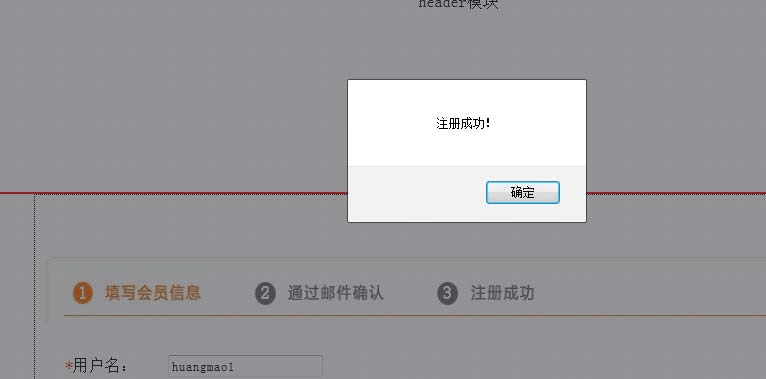
,
6、注册功能完成后,如果需要进行一些其他特殊操作,会员需要登陆到系统,接下来演示登陆功能的实现,首先新建Login.aspx 的页面,进行页面布局,具体代码如下:
用户名: | ErrorMessage ="不能为空" ControlToValidate ="txtName"> | |
密码: | ErrorMessage ="不能为空" ControlToValidate ="txtPwd"> | |
运行效果图如下:

7、前台代码写完之后,开始编写登陆事件的后台代码, 具体代码如下: protected void Button1_Click(object sender, EventArgs e)
{
BLL. Users userBll = new BLL.Users ();
string userName = txtName.Text.Trim();
string userPwd = txtPwd.Text.Trim();
DataSet ds=new DataSet ();
ds = userBll.GetList(" userName='" userName "' and userPwd='" userPwd "'" ); if (ds != null )
{
if (ds.Tables[0].Rows.Count > 0)
{
ClientScript.RegisterStartupScript(this .GetType(), "success" , "");
//成功后提示再跳转
}
else
{
ClientScript.RegisterStartupScript(this .GetType(), "success" , "");
//成功后提示再跳转
}
}
else
{
ClientScript.RegisterStartupScript(this .GetType(), "success" , "");
//成功后提示再跳转
}
}
运行效果图如下:
,
8、登陆成功后,跳转进入个人空间,可以进行个人头像的修改,具体代码如下: Model. Users userModel = new Model.Users ();
BLL. Users userBll = new BLL.Users ();
protected void Page_Load(object sender, EventArgs e)
{
if (!IsPostBack)
{
if (Session["userModel" ] != null )
{
userModel = (Model.Users )Session["userModel" ];
if (userModel.userImg == "" ||userModel.userImg ==null )
{
Image1.ImageUrl = "../Images/admin/avatar.png";
}
else
{
Image1.ImageUrl = "../Images/admin/" userModel.userImg;
}
lblName.Text = userModel.userName;
lblPhone.Text = userModel.userTel.Trim();
,lblSex.Text = userModel.userSex == false ? " 女" : " 男" ;
}
else
{
ClientScript.RegisterStartupScript(this .GetType(), "success" , "");
//成功后提示再跳转
}
}
}
protected void Button1_Click(object sender, EventArgs e)
{
userModel = (Model.Users )Session["userModel" ];
if (FileUpload1.HasFile == false )
{
ClientScript.RegisterStartupScript(this .GetType(), "success" , "");
return ;
}
string IsXls = System.IO.Path .GetExtension(FileUpload1.FileName).ToString().ToLower(); if (IsXls != ".jpg" )
{
ClientScript.RegisterStartupScript(this .GetType(), "success" , "");
return ;
}
string str = (DateTime .Now).ToString("yyyyMMddHHmmss" );
string FileName = str IsXls;
try
{
string savePath;
savePath = Server.MapPath("../Images/admin/" FileName);
FileUpload1.SaveAs(savePath);
//UsersModel.userId = int.Parse(Session["userId"].ToString());
userModel.userImg = FileName;
//usersBLL.Add(UsersModel);
bool bl= userBll.Update(userModel);